Use the light nodes to create sources of light for a Scene in your Kanzi application.
Kanzi has these light node types:
- Directional Light emits light only in one direction and is suitable for modeling the sunlight. Each Scene by default contains a Directional Light.
- Point Light emits light from a specific location uniformly to all directions (360 degrees).
- Spot Light emits light from a specific location towards a specified direction in the shape of a cone.
Lights contain properties that are passed as uniforms to shaders when Kanzi renders 3D nodes. Lights affect only the rendering of nodes which use materials with shaders that use those lights. In Kanzi the Phong material types by default support one directional light, two point lights, and one spot light. See Setting the number of lights for a material type.
Creating a light node
To create a light node:
- In the Project press Alt and right-click the node where you want to create a light node and select Directional Light, Point Light, or Spot Light.
For example, create a Spot Light.
Note that you create light nodes only inside Scene and 3D nodes.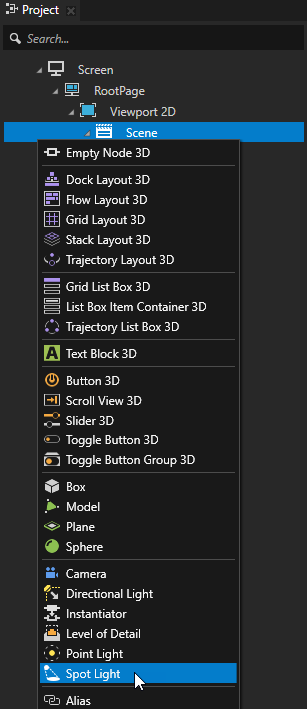
- In the Preview use the Node tool
 to position the light node.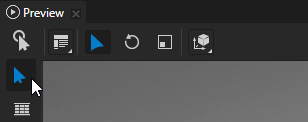
- In the Properties adjust the properties of the light node to create the light suitable for your needs.
For example, to adjust the color of the Spot Light set the Spot Light Color property.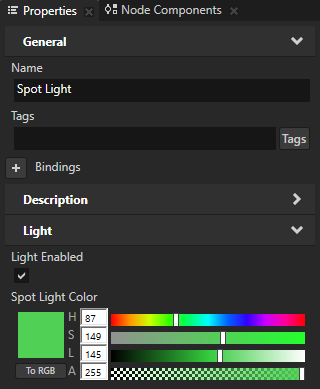
Setting the number of lights for a material type
For each material type you can set the type and number of lights the materials which are based of these material types can use to render nodes.
To set the number of lights for a material type
-
In the Library > Materials and Textures > Material Types select the material type for which you want to set the lights.
For example, select the VertexPhong material type.
You can use this approach only for the Phong material types. To modify the number of lights for other material types, you must manually edit the material shaders. See Editing shaders.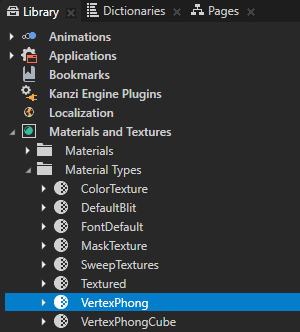
- In the Properties in the Preprocessor Defines property for each light type set the Value to the number of lights you want to use:
- KANZI_SHADER_NUM_DIRECTIONAL_LIGHTS to set the number of directional lights
- KANZI_SHADER_NUM_POINT_LIGHTS to set the number of point lights
- KANZI_SHADER_NUM_SPOT_LIGHTS to set the number of spot lights
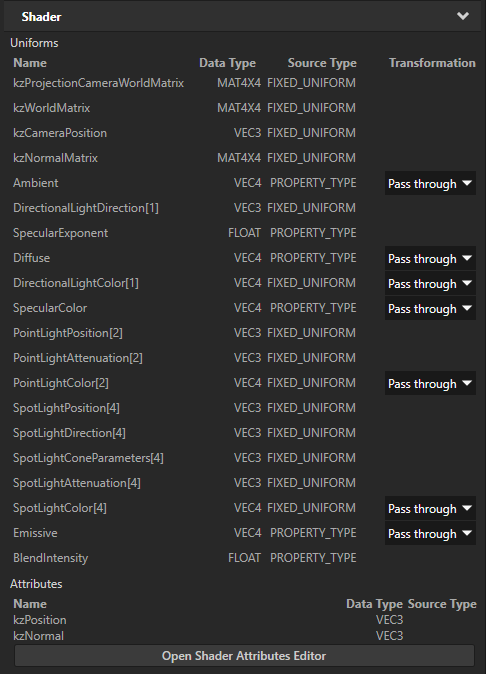
When you press the Enter key Kanzi Studio updates in the Uniforms the uniform arrays for the properties of the light types you changed.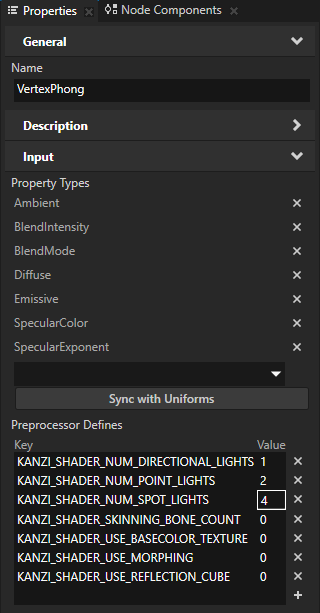
Using the light nodes in the API
To create and set a directional light:
// Create a directional light named Directional light.
LightSharedPtr directionalLight = Light::createDirectional(domain, "Directional light");
// Rotate the directional light node by -45 degrees around the x axis.
SRTValue3D layoutTransformation = directionalLight->getLayoutTransformation();
layoutTransformation.setRotation(Vector3(kzsDegreesToRadians(-45.0f), 0.0f, 0.0f));
directionalLight->setLayoutTransformation(layoutTransformation);
// Set the color of the directional light to red.
directionalLight->setDirectionalLightColor(ThemeRed);
To create and set a point light:
// Create a point light named Point light.
LightSharedPtr pointLight = Light::createPoint(domain, "Point light");
// Move the point light on y axis by 4 units.
SRTValue3D layoutTransformation = pointLight->getLayoutTransformation();
layoutTransformation.setTranslation(Vector3(0.0f, 4.0f, 0.0f));
pointLight->setLayoutTransformation(layoutTransformation);
// Set the color of the point light to green.
pointLight->setPointLightColor(ThemeGreen);
// Set the constant attenuation for the point light to 0.8, and linear and quadratic attenuation to 0.
pointLight->setPointLightAttenuation(Vector3(0.8f, 0.0f, 0.0f));
To create and set a spot light:
// Create a spot light named Spot light.
LightSharedPtr spotLight = Light::createSpot(domain, "Spot light");
// Move the spot light on x axis by 4 units and rotate it around the y axis by 90 degrees.
SRTValue3D layoutTransformation = spotLight->getLayoutTransformation();
layoutTransformation.setTranslation(Vector3(4.0f, 0.0f, 0.0f));
layoutTransformation.setRotation(Vector3(0.0f, kzsDegreesToRadians(90.0f), 0.0f));
spotLight->setLayoutTransformation(layoutTransformation);
// Set the color of the spot light to blue.
spotLight->setSpotLightColor(ThemeBlue);
// Set the angle of the spot light cone to 45 degrees.
spotLight->setSpotLightCutoffAngle(45.0f);
// Set how concentrated the spot light is.
spotLight->setSpotLightExponent(30.0f);
// Set the constant attenuation for the spot light to 1.3, and linear and quadratic attenuation to 0.
spotLight->setSpotLightAttenuation(Vector3(1.3f, 0.0f, 0.0f));
For details, see the Light class in the API reference.
Light node property types
For lists of the available property types for the light nodes, see:
